|  Case Studies  / Lose It!  |

AI Meal Planning for Lose It!

AI-driven meal planning made simple.

Case Study
This end-to-end case study was completed as part of my CareerFoundry Product Design course, demonstrating my understanding of the design thinking process—including workshop facilitation, user research, prototyping, usability testing, and iterative design.
About Lose It!
Lose It! is a mobile app designed to help users eat smarter and reach their health 
goals—whether they’re aiming to lose weight, maintain a healthy lifestyle, or improve overall fitness.
Key Features
The app includes features such as meal logging, barcode scanning, macro tracking, intermittent fasting support, fitness tracker integration, and personalized insights. Users typically interact with Lose It! multiple times a day—after meals, while grocery shopping, or when planning ahead.
Objective
This project introduces an AI-powered chatbot to enhance the Lose It! experience by reducing decision fatigue and helping users quickly plan meals through intuitive, conversational support.

Designed for clarity and ease of use, the questionnaire dynamically adapts to user responses, ensuring a personalized Medicare selection process. With intuitive navigation and structured guidance, seniors can confidently progress through each step.

Understanding the Project
Smart Goal
To design and prototype a conversational assistant that offers personalized mealsuggestions aligned with user goals—aiming to reduce decision fatigue andimprove daily meal logging frequency by at least 10% within a 3-month period.
How Might We Statement
How might we help users discover personalized meal suggestions that align withtheir nutrition goals and dietary preferences, so they can eat with more varietyand confidence?
Chatbot Solution Direction
A conversational assistant could:
  • Ask the user what they feel like eating (“Something quick?” “Need high protein?”)
  • Offer variety by suggesting similar alternatives or new recipes
  • Recommend meals based on logged history and dietary goals
  • Let users quickly add the suggested meal to their log or save it for later
This creates a more guided and engaging experience, helping users stay on trackwithout getting stuck in food ruts.
Competitive Analysis
Competitors Solving a Similar Problem
HeathifyMe:
  • Offers AI-powered nutrition coaching through "Ria."
  • Provides personalized meal plans and real-time suggestions.
  • Limitations: Market focus primarily in Asia; relies on human coaching.
Yazio:
  • Emphasizes structured, goal-based nutrition planning.
  • Includes visual meal planners and fasting trackers.
  • Limitations: Planning requires manual setup; lacks adaptive AI suggestions.
Competitor Profile: HealthifyMe
Key Message & Strategy:
Acts as a digital nutritionist, offering AI-powered guidance and real-time meal recommendations through "Ria."
Competitive Advantage:
  • AI-powered chatbot (Ria) for personalized suggestions.
  • Personalized meal planning and real-time guidance.
  • Integration with diet and fitness coaches.
Product Experience:
  • User Base: 30+ million (primarily in Asia).
  • Usability: Conversational and goal-driven.
  • Navigation: Coach Chat, Meals, Health Insights.
  • CTAs: "Ask Ria," "Plan Meals," "Upgrade to Pro."
Competitor Profile: Yazio
Key Message & Strategy:
Offers structured, goal-based nutrition planning and integrates fasting as part of daily health routines.
Competitive Advantage:
  • Visual weekly meal planner.
  • Custom diet paths (e.g., keto, vegan).
  • Built-in fasting tracker.
Product Experience::
  • User Base: 10+ million.
  • Usability: Smooth onboarding and setup.
  • Navigation: Meal Plan, Recipes, Fasting Tracker.
  • CTAs: "Plan Day," "Start Fast," "Add Meal."
Takeaway Summary
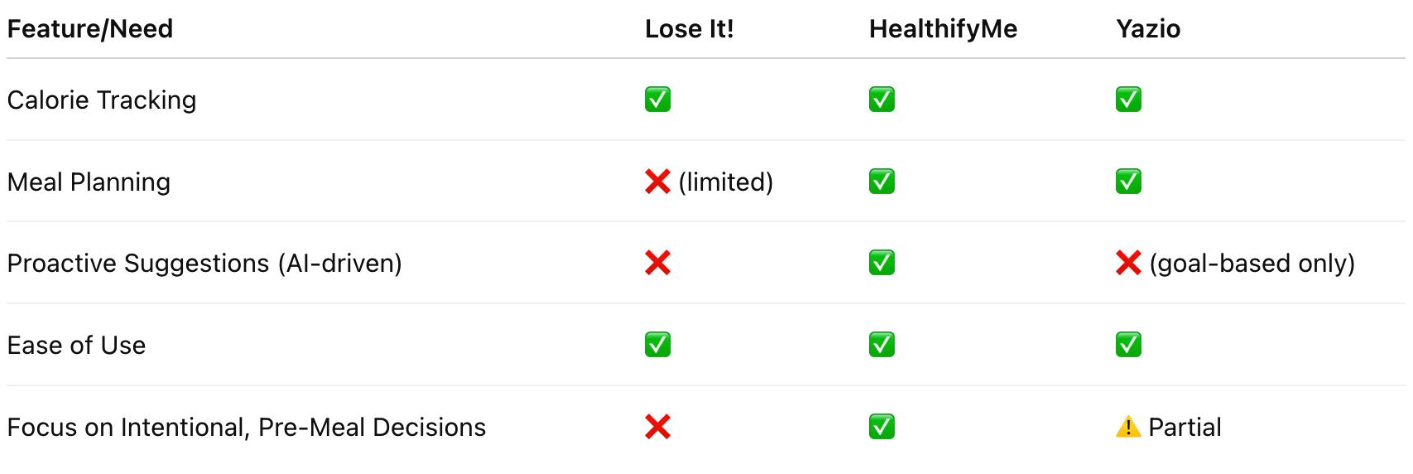
Comparison Table:
Conclusion: Market Gap
While apps like Lose It!, HealthifyMe, and Yazio offer helpful tools for calorie tracking and diet planning, they do not fully solve the problem of proactive, intelligent meal planning. These platforms focus on food logging or require the user to manually build a plan, placing the burden of nutritional foresight on the user. Even AI-based options provide reactive advice rather than anticipatory guidance. There remains a significant opportunity to create a product that delivers personalized, forward-looking meal suggestions based on user routines, goals, and lifestyle patterns. This gap highlights the need for a solution that helps users make intentional choices ahead of time, not just record what already happened.
User Personas, Stories, & Journeys
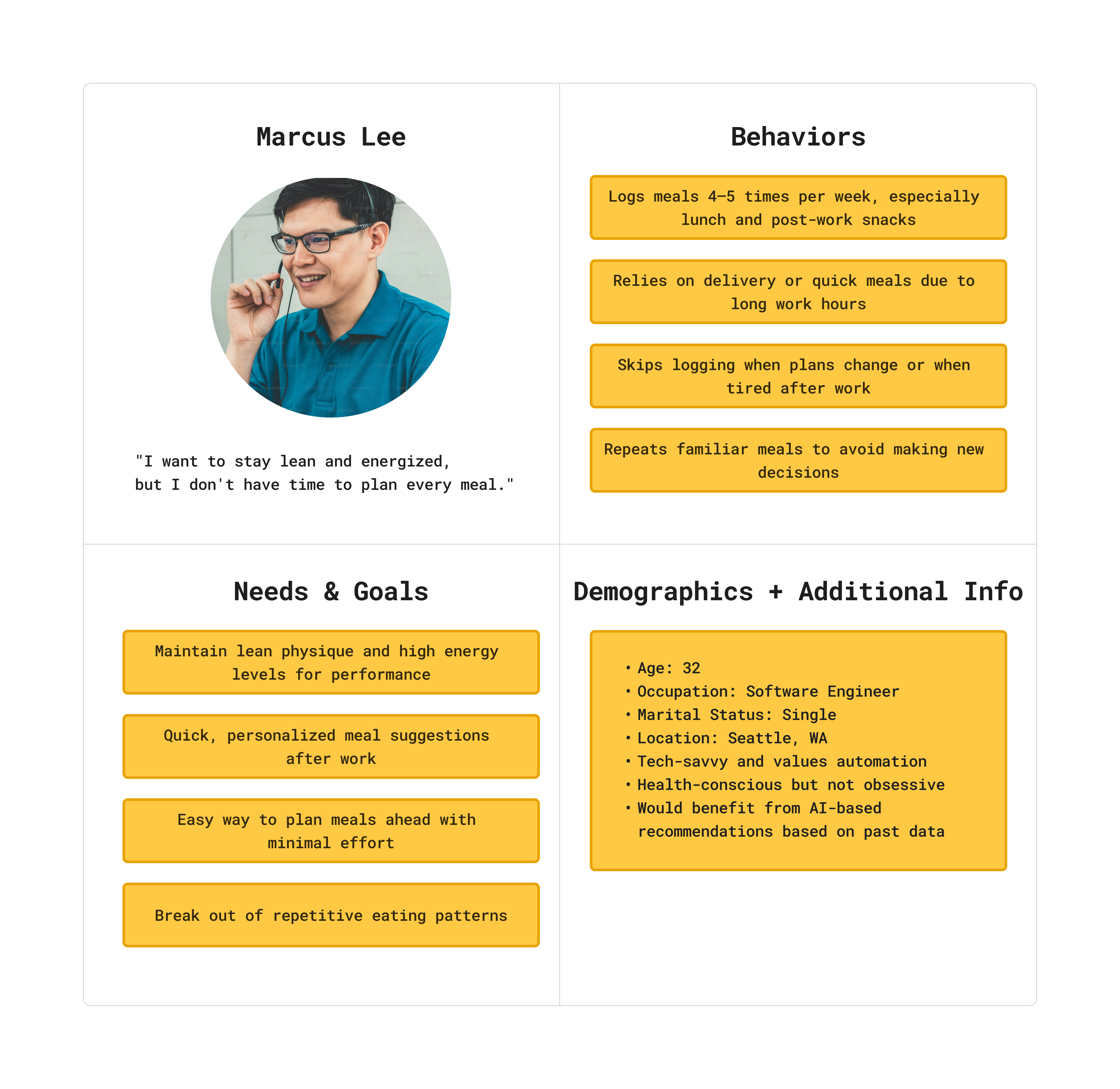
Personas
I ensured the mobile UI provided:
User Stories for Lose It!
  • As a busy professional, I want to receive personalized meal suggestions based on my previous logs and preferences so that I don’t waste time deciding what to eat after work.
  • As a health-conscious app user, I want to pre-plan and save meals for the next few days so that I can stay consistent even during my busiest weeks.
  • As a repeat user of Lose It!, I want to see smart reminders based on my usual logging habits so that I stay motivated to track daily without feeling overwhelmed.
  • As someone tracking macros, I want to reuse and tweak meals I’ve logged before so that I can avoid repetitive eating without starting from scratch each time.
  • As a tech-savvy health optimizer, I want the app to highlight gaps in my meal plan and suggest options to fill them so that I can better meet my nutrition goals each day.
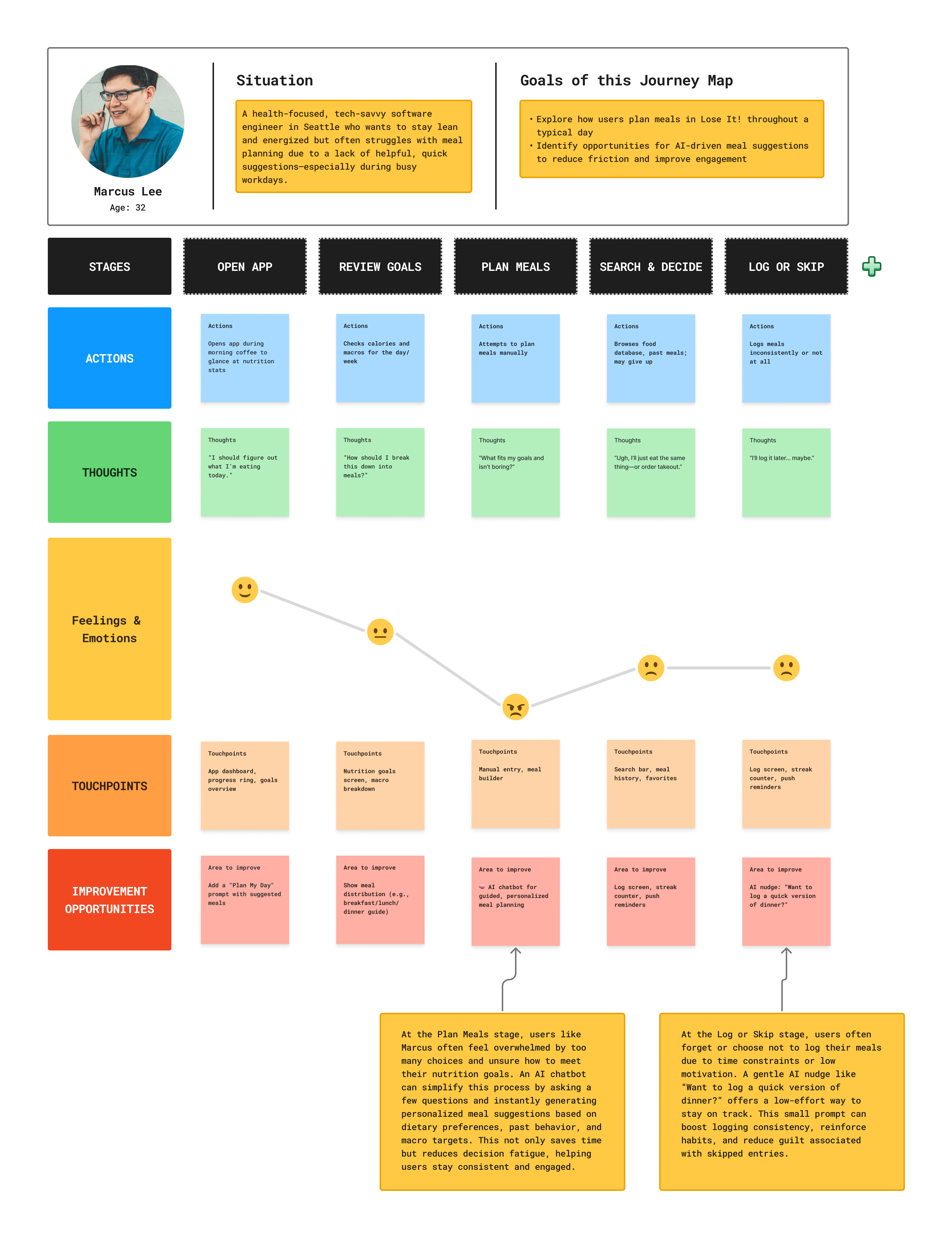
Journey Map
I ensured the mobile UI provided:
Key Solutions
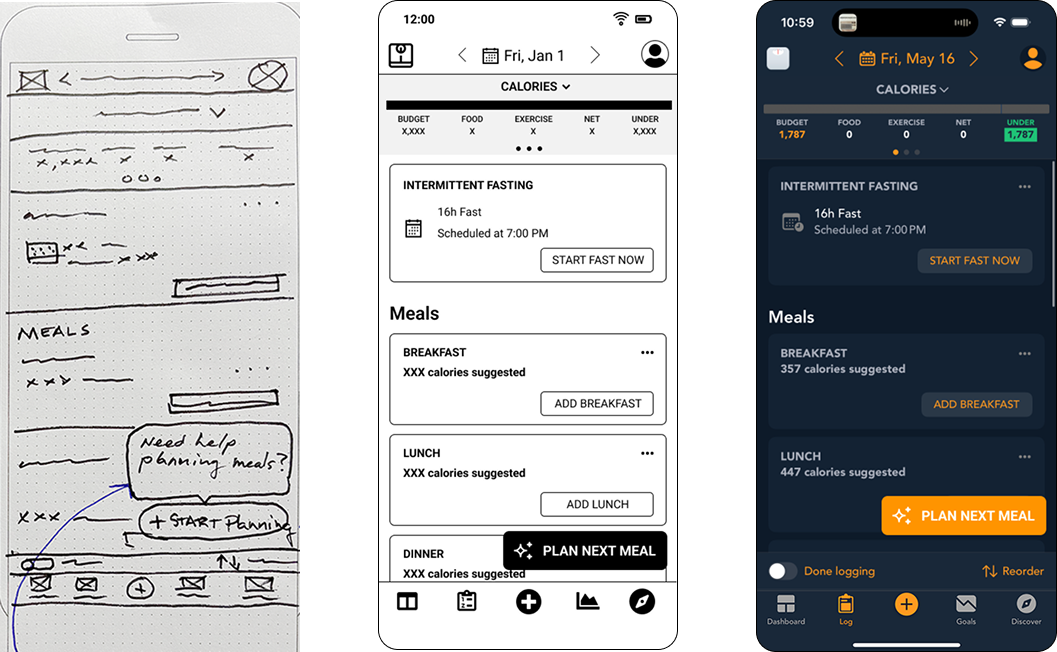
Overview of the Visual Design Process
I ensured the mobile UI provided:
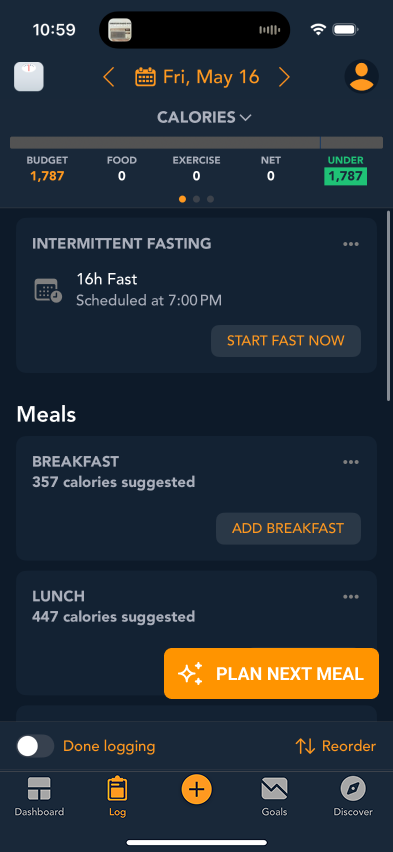
  • Lo-Fi Wireframe: Early sketch exploring layout and introducing the FAB for quick meal planning access above the sticky nav.
  • Mid-Fi Prototype: The black-and-gray wireframe refined the structure and hierarchy. The FAB was tested in this position for visibility and ease of access during usability testing sessions.
  • Hi-Fi Design: A polished screen with visual styling, icons, and improved spacing. The FAB remains fixed in the lower-right corner, providing consistent, intuitive access to the chatbot planner.

Figma workspace displaying the development of the Advice Center questionnaire prototype, showcasing the structured flow of wireframes and interaction design iterations.

Overview of the Visual Design Process
I ensured the mobile UI provided:

Prototype exploration of accessing the journey navigation via a snack bar at the bottom of the screen, demonstrating a clickable interaction for smooth navigation.

Usability Testing
Overview of the Usability Testing Process
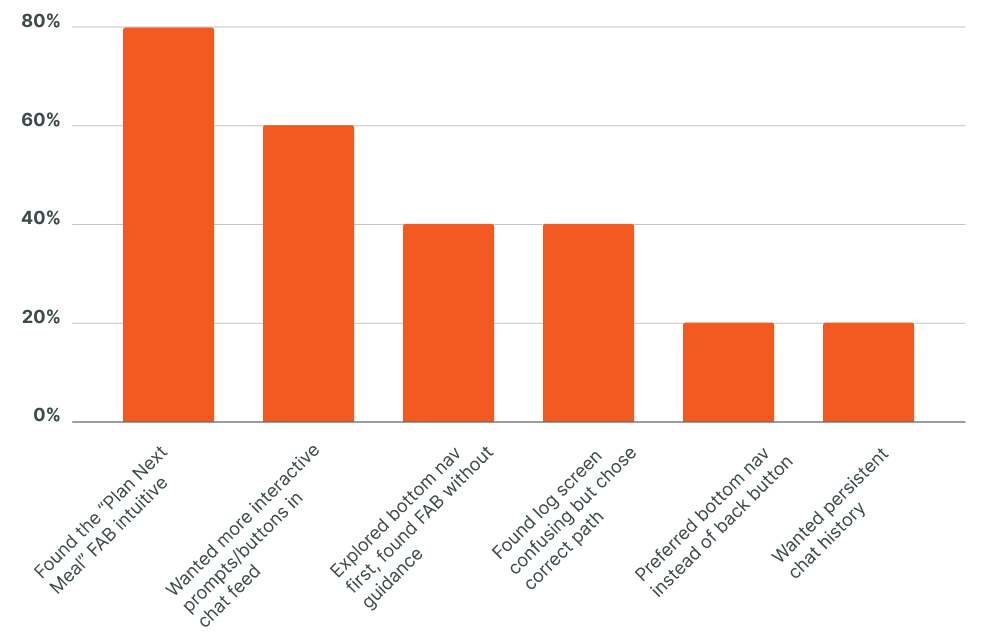
I conducted a moderated usability study with five participants to evaluate the effectiveness of a chatbot integration within the Lose It! app. Using a mixed-method approach—observing task completion and collecting qualitative feedback—I tested key interactions like launching the chatbot, entering requests, and navigating chat features. Most participants found the chatbot intuitive and useful, though several requested clearer prompts and more interactive elements. Based on this feedback, I made updates to the prototype and created a detailed usability test plan and report. You can view the full results and plan here:
View Full Usability Test Report
Methodology
  • 5 participants 
(in-person, 1-on-1)
  • 15-minute sessions
  • Tested 4 core tasks
  • Focused on chatbot entry point and chat usability
Key Findings

Summary of key usability findings from five user tests, highlighting intuitive use, feature requests, and navigation preferences.

Key Takeaways & Next Steps
What went well:
  • Persona-driven decisions
  • Wireframing and iteration
  • Solid user feedback
What could improve:
  • Early clarity on navigation priorities
  • Limiting assumptions on user behavior
  • Planning for alternate flows earlier
Next Steps
  • A/B test FAB vs. bottom nav placement
  • Evaluate navigation and layout updates based on user feedback
Final Thoughts
Conclusion
Usability testing validated the chatbot direction. 4 of 5 participants completed tasks intuitively using the FAB, but feedback also revealed desire for greater interactivity and better discoverability. Placement of the “Plan Meal” function in bottom nav may enhance clarity and should be explored further.
For my full work history, visit my LinkedIn:
View LinkedIn Profile